






How to Create Cartoon & Manga 3D Avatars with Character Creator 4.3
Creating the perfect 3D avatar is a blend of art and technology. While there are numerous tools available, navigating through them can be a maze. That’s why we’re breaking it down for you today. In our latest tutorial, we delve deep into how you can easily craft cartoon & manga 3D avatars using Character Creator 4.3 and the Headshot 2.0 plugin.
Why Character Creator 4.3?
Character Creator 4, or CC4, is a revolutionary tool that simplifies the process of creating detailed 3D avatars. Coupled with the Headshot 2.0 plugin, this powerful combo allows users to convert Vroid Manga Avatar to ccAvatar using the mesh workflow.
The Process Simplified:
- Getting Started with Vroid Studio – This is your first step. Before diving into CC4, familiarize yourself with Vroid Studio. Get Vroid Studio here.
- Converting with Vroid VRM to FBX – Once you have your design from Vroid, you need to convert it. This is where the Vroid VRM to FBX Converter comes in.
- Wraping 3D mesh with Plugins – The Headshot 2.0 Plugin for CC4 is your next stop. Also, enhance your avatar’s eyes with the Freedom Manga Eyes for Character Creator 4.
Get Headshot 2.0 Plugin: https://bit.ly/41q5JT6 - Crafting in Character Creator 4 – Now, move your converted file to CC4. If you haven’t yet got CC4, grab it here.
Lesson Manual: Creating a Cartoon & Manga 3D Avatar
1. Introduction
- Brief overview of the entire process.
- Introducing tools and plugins you will be using.
2. Vroid Studio
- Designing an Avatar
- Basics of character design.
- Exploring the user interface and key features.
- Exporting the Design
- Saving your character.
- How to export your design as VRM.
3. Vroid VRM to FBX Converter
- Introduction to the converter tool.
- Step-by-step process to convert VRM to FBX.
- Checking the quality and details of the converted FBX.
4. Importing to Character Creator 4 (CC4)
- Introduction to CC4 interface.
- Procedure to import the FBX file.
- Tips on ensuring the design remains consistent during import.
5. Hairstyle in CC4
- Saving the hairstyle of your avatar.
- Tips on managing and categorizing hairstyles.
6. Headshot 2.0 Mesh Workflow
- Introduction to wrapping using Headshot 2.0.
- Detailed process to get the best results.
- Troubleshooting common issues during wrapping.
7. Applying Freedom Manga Eyes
- Brief on the importance of eyes in character design.
- How to apply and adjust the Freedom Manga Eyes.
- Tips on customizing for various expressions.
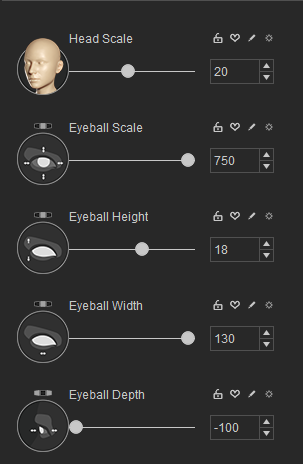
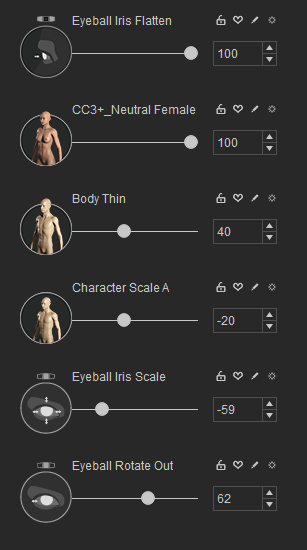
8. Morph Adjustments in CC4
- Introduction to morphs.
- Detailed steps on adjusting morphs for better avatar aesthetics.
- Best practices in morph adjustments.
9. Applying Hairstyle in CC4
- How to retrieve and apply the saved hairstyle.
- Tips on tweaking the hairstyle for better fit and look.
10. Dressing Up Your Avatar
- Exploring the clothing options in CC4.
- Applying and adjusting clothes for a perfect fit.
- Best practices to ensure realistic clothing dynamics.
11. Conclusion
- Recap of the entire process.
- Encouraging learners to experiment and create their unique avatars.
- Mention of further resources and advanced tutorials.
Dive Deeper with Freedom Arts 3D:
For those of you who wish to explore further, Freedom Arts 3D offers a plethora of resources, tutorials, and content. Our focus? Empowering you in 3D modeling, animation, game development, and more. Discover more on our website.
In Conclusion:
The realm of 3D modeling and animation is vast and fascinating. With tools like Character Creator 4.3, the process becomes more accessible and enjoyable. Whether you’re a seasoned artist or a newbie, our tutorial is designed to guide you every step of the way. Dive in, create, and let your imagination soar!
For more insights, tips, and tutorials, don’t forget to subscribe to our YouTube channel. Your support fuels our passion.
Leave a Reply
You must be logged in to post a comment.